Generating Realistic AI Images: A Step-by-Step Guide for Beginners
This guide provides a comprehensive, step-by-step approach for beginners to master generating realistic AI images, covering essential tools, effective prompting techniques, and advanced tips for achieving photorealistic results with artificial intelligence.
By: adminwp2 on April 17, 2026
Advertisements
Mastering the art of generating realistic AI images involves understanding core principles of AI art, selecting appropriate tools, crafting precise prompts, and refining outputs to achieve stunning photorealistic results.
The world of artificial intelligence is rapidly transforming how we create and visualize ideas. For beginners, the journey into generating realistic AI images might seem daunting, but with the right guidance, anyone can unlock the power of these incredible tools. This guide will walk you through the essential steps, from understanding the basics to mastering advanced techniques, ensuring you can produce stunning, lifelike visuals with ease.
Understanding the Foundations of Realistic AI Image Generation
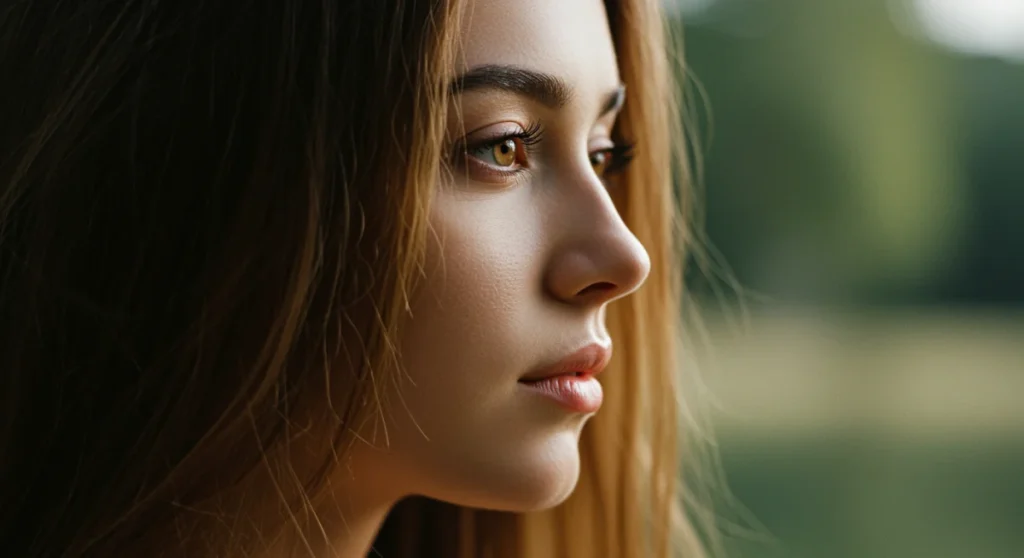
Before diving into the practical aspects, it’s crucial to grasp what makes an AI-generated image appear realistic. It’s not just about replicating reality, but about convincing the human eye that what it sees could genuinely exist. This involves a complex interplay of algorithms, data, and user input, all working together to render intricate details, accurate lighting, and believable textures.
Modern AI image generators, often based on diffusion models, learn from vast datasets of existing images. They identify patterns, styles, and relationships between objects, colors, and light. When you provide a text prompt, the AI essentially ‘imagines’ an image that fits your description, drawing upon its extensive knowledge to construct a visual from scratch. The realism comes from the AI’s ability to synthesize these learned patterns into a coherent and visually plausible output.
The Role of Training Data and Model Architecture
The quality and diversity of the training data are paramount in achieving realistic results. Models trained on high-resolution, diverse photographic datasets tend to produce more lifelike images. Furthermore, the underlying architecture of the AI model, such as the number of parameters and the sophistication of its diffusion process, directly impacts its capacity for detail and nuance.
Data Quality: High-resolution, varied images are essential for realistic outputs.
Model Size: Larger models often capture more intricate details and nuances.
Architectural Advances: Continuous research improves realism and coherence.
In essence, realistic AI image generation is a testament to the power of machine learning, where algorithms learn to mimic the complexities of our visual world. By understanding these foundational concepts, beginners can better appreciate the capabilities and limitations of the tools they are using, paving the way for more effective and impressive creations.
The landscape of AI image generators is constantly evolving, with new tools emerging regularly. For beginners focused on creating realistic images, selecting the right platform is a critical first step. Each tool has its strengths, unique features, and a distinct learning curve. Your choice will significantly influence the quality and style of your generated images.
Some of the most popular and effective tools for realistic AI image generation include Midjourney, Stable Diffusion, and DALL-E 3. While DALL-E 3, often integrated into platforms like ChatGPT Plus, offers remarkable ease of use, Midjourney is renowned for its artistic flair and photorealistic capabilities, and Stable Diffusion provides unparalleled control for those willing to delve deeper.
Popular Tools and Their Strengths
Let’s explore some of the leading contenders and what makes them suitable for generating realistic AI images:
Midjourney: Known for its exceptional photorealism and artistic quality. It excels at generating images with a cinematic feel, often requiring less complex prompting for impressive results. Its community-driven nature also fosters learning and sharing.
Stable Diffusion: An open-source model that offers immense flexibility and customization. It can be run locally on powerful hardware, providing users with complete control over the generation process, including fine-tuning models for specific styles.
DALL-E 3: Integrated with natural language processing, DALL-E 3 is excellent at interpreting complex and nuanced prompts. It often produces highly coherent images that accurately reflect detailed descriptions, making it very user-friendly.
When starting, consider your technical comfort level and your desire for control versus ease of use. Midjourney offers a great balance for beginners seeking high-quality realistic outputs without deep technical knowledge, while Stable Diffusion is ideal for those who want to experiment with advanced settings and custom models. DALL-E 3 is perfect for quick, accurate results based on direct textual descriptions.
Crafting Effective Prompts for Photorealism
The prompt is your conversation with the AI, and its quality directly dictates the realism of the output. Think of it as giving precise instructions to a highly skilled, albeit literal, artist. A vague prompt will yield vague results, but a detailed, well-structured prompt can unlock astonishing photorealistic images.
Effective prompting involves more than just listing objects. It requires describing the scene, lighting, mood, camera settings, and even the artistic style you’re aiming for. For photorealism, specificity is your best friend. Instead of saying ‘a car,’ specify ‘a vintage 1960s Ford Mustang, gleaming chrome, parked on a cobblestone street at sunset.’
Key Elements of a Photorealistic Prompt
To guide the AI towards realism, incorporate these elements into your prompts:
Subject Detail: Describe the main subject with as much detail as possible (e.g., ‘a weathered old man with deep wrinkles, piercing blue eyes, and a kindly smile’).
Environment and Background: Set the scene (e.g., ‘standing in a bustling marketplace, blurred background, soft natural light’).
Lighting: Specify the type and direction of light (e.g., ‘golden hour sunlight, dramatic shadows, rim lighting, overcast sky’).
Camera Settings: Mimic photography terms (e.g., ‘shot on a Canon R5, 50mm lens, f/1.8, shallow depth of field, sharp focus’).
Negative Prompts (if available): Specify what you *don’t* want to see (e.g., ‘blurry, cartoon, low quality, distorted’).
Experimentation is key. Start with a basic prompt and gradually add more descriptive elements, observing how each addition influences the output. Pay attention to the order of your keywords, as some models prioritize terms appearing earlier in the prompt. Mastering prompt engineering is an ongoing process of learning and refinement.
Advanced Techniques for Enhancing Realism
Once you’ve mastered basic prompting, several advanced techniques can push your AI-generated images from good to truly exceptional. These methods often involve leveraging specific model features, iterative refinement, and understanding the nuances of how AI interprets various commands.
One powerful technique is using image-to-image generation, where you provide an initial image (e.g., a sketch or a photograph) and guide the AI to transform it into a more realistic version based on your text prompt. This allows for greater control over composition and initial forms, which can be challenging to achieve with text alone.
Iterative Refinement and Parameter Adjustment
Instead of trying to get a perfect image in one go, adopt an iterative approach:
Start Simple: Begin with a broad prompt to establish the main composition and subject.
Refine Details: Generate multiple variations, then select the most promising one and add more specific details to your prompt for the next iteration.
Adjust Parameters: Experiment with model-specific parameters like ‘stylize’ in Midjourney or ‘CFG Scale’ in Stable Diffusion to control the AI’s adherence to the prompt versus its creative interpretation. Lower stylization/CFG often yields more literal, realistic results.
Seed Values: In some models, using a ‘seed’ value allows you to regenerate variations from a specific image, helping maintain consistency while making minor adjustments to the prompt.
Another crucial aspect is understanding the model’s ‘personality.’ Each AI model has a slightly different way of interpreting prompts and a distinct artistic bias. Learning these nuances through consistent practice will enable you to tailor your prompts more effectively and anticipate the kind of output you’ll receive. Don’t be afraid to read community guides and tutorials specific to your chosen tool.
Overcoming Common Challenges in Realistic AI Image Generation
Even with advanced tools and techniques, generating perfectly realistic AI images can present challenges. AI models, while powerful, are not infallible and can sometimes produce artifacts, anatomical inaccuracies, or images that just don’t quite hit the mark. Understanding these common pitfalls and knowing how to address them is crucial for success.
One frequent issue is the ‘uncanny valley’ effect, where an image is almost realistic but has subtle flaws that make it appear unsettling or unnatural. This often occurs with human faces or hands, which are notoriously difficult for AI to render perfectly. Another challenge is maintaining consistency across multiple images, especially if you’re trying to generate a series with the same character or setting.
Strategies for Troubleshooting and Improvement
Here are some strategies to overcome common challenges:
Anatomical Anomalies: For issues with hands, eyes, or other body parts, try adding specific descriptors like ‘perfect hands,’ ‘anatomically correct,’ or ‘five fingers.’ If the problem persists, generate multiple images and select the best one, or use inpainting/outpainting tools (available in some platforms) to manually correct flaws.
Prompt Conflicts: Sometimes, conflicting keywords in your prompt can confuse the AI. Simplify your prompt, focusing on one or two key elements at a time, and gradually build complexity. Review your prompt for any contradictory terms.
Lack of Detail: If images lack detail, explicitly request ‘ultra-detailed,’ ‘8K,’ ‘high resolution,’ ‘intricate,’ or ‘photorealistic.’ Increase the number of generation steps (if applicable in your tool) or experiment with higher stylization values initially, then dial them back.
Consistency Across Images: For character consistency, use the same seed value and prompt for variations. For specific characters, some advanced models allow for ‘character reference’ images or ‘LoRAs’ (Low-Rank Adaptation) that help maintain a consistent look.
Patience and persistence are virtues in AI image generation. Each generation is an opportunity to learn what works and what doesn’t. Analyze your outputs, identify areas for improvement, and adjust your prompts or techniques accordingly. The community forums and tutorials specific to your chosen AI tool are also invaluable resources for troubleshooting.
Ethical Considerations and Responsible Use of AI Image Generation
As the capabilities of AI image generation grow, so does the importance of addressing the ethical implications of this powerful technology. Generating realistic AI images, particularly those depicting people, raises questions about authenticity, consent, and potential misuse. It’s crucial for every user to approach this technology responsibly and ethically.
The ability to create highly convincing fake images, often referred to as ‘deepfakes,’ has significant societal implications, from spreading misinformation to infringing on privacy. As creators, we have a responsibility to be aware of these issues and to use AI art tools in ways that are respectful, transparent, and beneficial.
Navigating the Ethical Landscape
Consider these ethical guidelines when generating realistic AI images:
Transparency: Be transparent about the AI origin of your images, especially if they are highly realistic and could be mistaken for real photographs. Labeling AI-generated content helps prevent confusion and misinformation.
Consent and Impersonation: Never generate realistic images of identifiable individuals without their explicit consent. Using AI to create deceptive content or impersonate others is unethical and potentially illegal.
Bias and Representation: AI models are trained on existing data, which can contain biases. Be mindful of how your prompts might perpetuate or challenge these biases, and strive for diverse and inclusive representation in your creations.
Copyright and Attribution: The legal landscape around AI art and copyright is still evolving. Be aware of the terms of service for the AI tools you use regarding commercial use and attribution.
Responsible use also extends to avoiding the generation of harmful, hateful, or explicit content. Most reputable AI image generators have content moderation policies in place, but the ultimate responsibility lies with the user. By adhering to ethical principles, we can ensure that AI image generation remains a creative and constructive force.
Integrating AI Image Generation into Your Workflow
For beginners and seasoned professionals alike, integrating AI image generation into an existing creative or professional workflow can dramatically enhance productivity and open up new avenues for visual expression. Realistic AI images can serve a multitude of purposes, from concept art and marketing materials to educational content and personal projects.
Think about how AI can complement your current skills rather than replace them. For instance, a graphic designer might use AI to quickly generate variations of a product shot, saving hours of traditional photography or 3D rendering. An architect could visualize different material textures or lighting conditions for a building design with unprecedented speed.
Practical Applications and Efficiency Gains
Here’s how AI image generation can be integrated:
Concept Art and Storyboarding: Rapidly visualize ideas for films, games, or advertisements, iterating on concepts much faster than traditional methods.
Marketing and Advertising: Create unique, eye-catching visuals for campaigns, social media, and product mockups without the need for extensive photoshoots.
Web and UI Design: Generate placeholder images, icons, or background textures that fit a specific aesthetic, accelerating the design process.
Educational Content: Produce realistic illustrations for textbooks, presentations, or online courses, making complex topics more engaging.
Personal Projects: Explore creative ideas, illustrate stories, or simply create beautiful art for personal enjoyment, pushing the boundaries of your imagination.
The key to successful integration is understanding AI’s strengths and limitations. It excels at generating novel compositions and styles based on text inputs, but it still often requires human oversight and refinement. Use AI as a powerful assistant that can bring your visions to life more quickly and efficiently, freeing you to focus on the higher-level creative direction and strategic thinking. Embrace it as an extension of your creative toolkit, and you’ll discover its immense potential.
Key Aspect
Brief Description
Tool Selection
Choose between Midjourney, Stable Diffusion, or DALL-E 3 based on desired control vs. ease of use for realistic outputs.
Prompt Engineering
Craft detailed prompts including subject, environment, lighting, and camera settings for photorealism.
Iterative Refinement
Refine images through multiple generations, adjusting prompts and parameters for optimal realism.
Ethical Use
Ensure transparency, obtain consent, and avoid harmful content when creating AI-generated images.
Frequently Asked Questions About Realistic AI Images
What are the best AI tools for generating photorealistic images?▼
For photorealism, Midjourney is highly recommended for its artistic quality and ease of use. Stable Diffusion offers extensive control for advanced users, while DALL-E 3, often via ChatGPT Plus, excels at interpreting complex prompts accurately. Each tool has unique strengths in achieving realistic outputs.
How can I make my AI prompts more effective for realism?▼
To enhance realism, your prompts should include detailed descriptions of the subject, environment, lighting conditions, and even camera settings (e.g., lens type, aperture). Use keywords like ‘photorealistic,’ ‘ultra-detailed,’ and ‘8K’ to guide the AI towards lifelike results.
What is the ‘uncanny valley’ effect in AI image generation?▼
The ‘uncanny valley’ describes the phenomenon where AI-generated images, particularly of human faces, are almost realistic but have subtle flaws that make them appear unsettling or unnatural rather than truly lifelike. It’s a common challenge in achieving perfect photorealism.
Is it ethical to generate realistic AI images of people?▼
Ethical generation of realistic AI images, especially of people, requires transparency about their AI origin and explicit consent if identifiable individuals are depicted. Avoiding impersonation, misinformation, and harmful content is crucial for responsible AI use.
Can AI image generation replace traditional photography or art?▼
AI image generation is a powerful complementary tool, not a replacement for traditional photography or art. It democratizes creation and accelerates workflows but still relies on human creativity, direction, and refinement to produce meaningful and high-quality results.
Conclusion
The journey of generating realistic AI images is an exciting and continuously evolving adventure. From understanding the core principles of AI models to meticulously crafting prompts and employing advanced refinement techniques, beginners have a clear path to creating stunning, lifelike visuals. While challenges like the ‘uncanny valley’ may arise, persistent experimentation and a commitment to ethical practices will pave the way for remarkable artistic and practical applications. Embrace these tools as extensions of your creativity, and you’ll find yourself at the forefront of a visual revolution, capable of bringing virtually any imagination to vivid, realistic life.